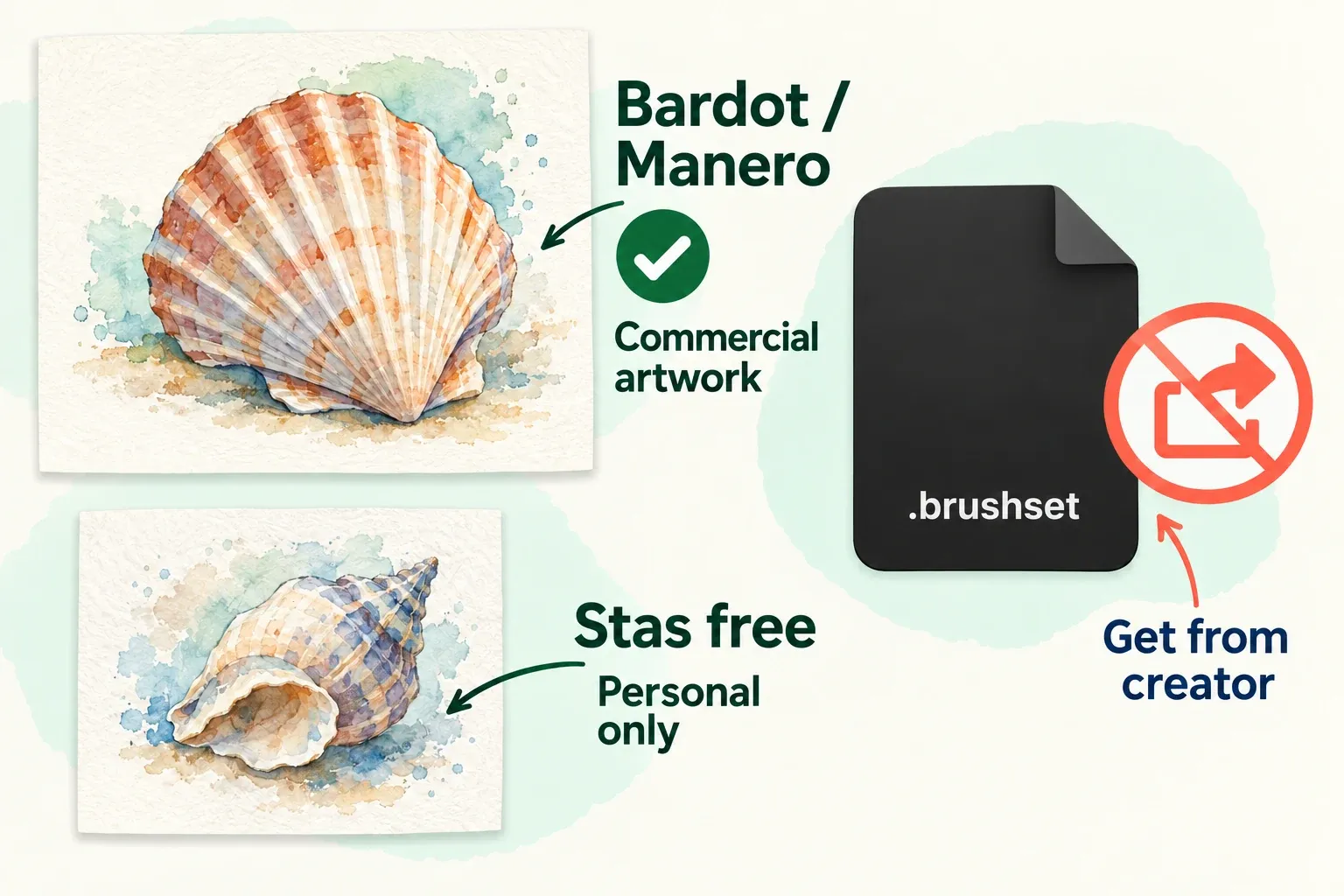

Start with Bardot Brush’s Watercolor Wonder sampler if you want a small set with a textured canvas and instructions. Choose Manero Brushes’ Watercolor Experience mini set for a pencil and two watercolor brushes with a prepared canvas. For a wider collection to explore in personal projects, Stas’s free 30-brush set gives you more brush types, but its free license excludes commercial use.
I would choose by the included paper, the learning material, and the license before counting brushes. The comparison below draws on the creators’ current download pages and published terms: what each free download includes, how you get it, and what its license allows.
Choose a free watercolor pack
| Pack | What the creator includes | Access and usage | My recommendation |
|---|---|---|---|
| Bardot Brush: Watercolor Wonder sampler | 3 brushes, a textured canvas, a user guide, and a tutorial | Free through an email form. Personal and commercial artwork allowed under Bardot’s license. | Start here if you want a guided introduction. |
| Manero Brushes: Watercolor Experience mini set | 3 brushes total: a pencil, a watercolor brush, and Rough Wash; plus a canvas with paper and watercolor textures | Gumroad, $0 minimum with optional payment. Personal and commercial projects allowed under Manero’s license. | Choose a compact sketch-and-wash kit. |
| Stas: Free 30 Realistic Watercolor Brushes | 30 brushes, including sketching, liners, textured and wet brushes, blending tools, and a canvas texture brush | Gumroad, $0 minimum with optional payment. Personal use only in the free version. | Explore more brush types for practice; skip the free version for work you sell. |
Check what the free download itself contains before you go by the pictures. These are free samples or versions of paid products, so a creator’s full-set gallery may show tools that the free download doesn’t include.
Bardot Brush: a guided first set
The Watercolor Wonder signup page lists three brushes, one textured canvas, a user guide, and a tutorial. It requires an email address. That combination is why I’d start here: you get instructions for the supplied setup rather than a folder of unexplained brushes.
Lisa Bardot also provides a watercolor-orange lesson made for the free sampler. Follow a lesson tied to the sample before judging the pack against pictures made with the larger paid collection.
Bardot Brush’s license permits personal and commercial work, including selling end products containing artwork made with the brushes. It prohibits selling, giving away, or redistributing the brush files and other downloaded content, including edited versions of the brushes. A finished print and a downloadable brush pack are different products.
Manero Brushes: a compact sketch-and-wash kit
The current Watercolor Experience free mini set contains a pencil brush, a watercolor brush, Rough Wash, and a Procreate canvas with paper and watercolor textures. Its Gumroad minimum is $0, and paying extra is optional. The creator lists compatibility with Procreate 5 and later.
The older Folio resource post describes two brushes. The current listing has three brushes in total, with Rough Wash added in 2024. One of those three is the pencil, so it isn’t a download of three watercolor painting brushes.
I like this option for a first sketch-and-wash study because it combines a small set of tools with the accompanying canvas. The creator describes the watercolor brush as pressure-sensitive. If you use Apple Pencil (USB-C), Apple’s feature comparison shows that it has no pressure sensitivity, so don’t choose a brush expecting pressure-controlled intensity from that Pencil.
The Manero Brushes license allows the free and paid brushes and tools in personal or commercial projects. You may not resell, redistribute, or share the assets with someone who hasn’t obtained them directly from Manero Brushes. Included instructional material has separate personal-use restrictions. Permission to sell your artwork doesn’t extend to republishing a guide or tutorial.
Stas: more variety, for personal practice
Stas’s free watercolor listing describes 30 brushes spanning sketching, watercolor liners, texture, blending, wet marks, and several edge styles. It also includes a canvas texture brush. That brush adds texture; don’t expect a separate, ready-made layered paper canvas from it.
The same page sets a $0 minimum and states that the free version is for personal use only. Commercial use comes with the full version. I’d reach for this free set for personal studies when you want more options to compare. For commissions, artwork sales, or products, choose a download with suitable commercial terms instead.
You can also start without downloading a pack
Procreate 5.4 already has a Watercolors set in the Procreate Library, described in the handbook as transparent wet brushes for washes, layering, and varied edges. The older Water set is in the Classic Library. If a tutorial sends you to Water, check which library it uses rather than assuming those brushes have disappeared.
If your immediate goal is to learn washes and layering, my default is the built-in Watercolors set. A downloadable sampler becomes useful when you want its specific paper setup or accompanying lesson. You don’t need a large collection to begin.
Import the brushes and keep the paper setup
Download from the creator’s linked page and keep the instructions and license with the files. Do not download only the brushes if the creator also supplies a canvas needed for the lesson. The following menu names follow Procreate 5.4.
- Unpack an archive first. If the download is a ZIP file, tap it in the iPad Files app to create a folder containing its contents. Open that folder and identify the brush file, canvas or texture, and instructions.
- Import the brush file. In Procreate’s Brushes view, open the top-right menu and choose Import from Files. Select the
.brush,.brushset, or.brushlibraryfile. These are brush assets; a paper canvas is imported separately. - Check where the brushes went. Find a single
.brushin the set named Imported. Find a.brushsetby its set name in the current library. For a.brushlibrary, open the Brush Libraries overview: pinch inward in Brushes, or tap the current library title and choose Back to libraries. Open the imported library by name. - Open the supplied canvas. For a
.procreatetemplate, use Import in the Gallery and select the file. Use the creator’s designated painting layer and instructions; keep paper layers and their arrangement intact. If you receive a standalone texture image instead, follow the instructions for that image rather than treating it as a brush file. - Keep a clean template. Before painting, swipe the canvas thumbnail left in the Gallery and tap Duplicate. Work in the duplicate so you can return to the original setup for another piece.
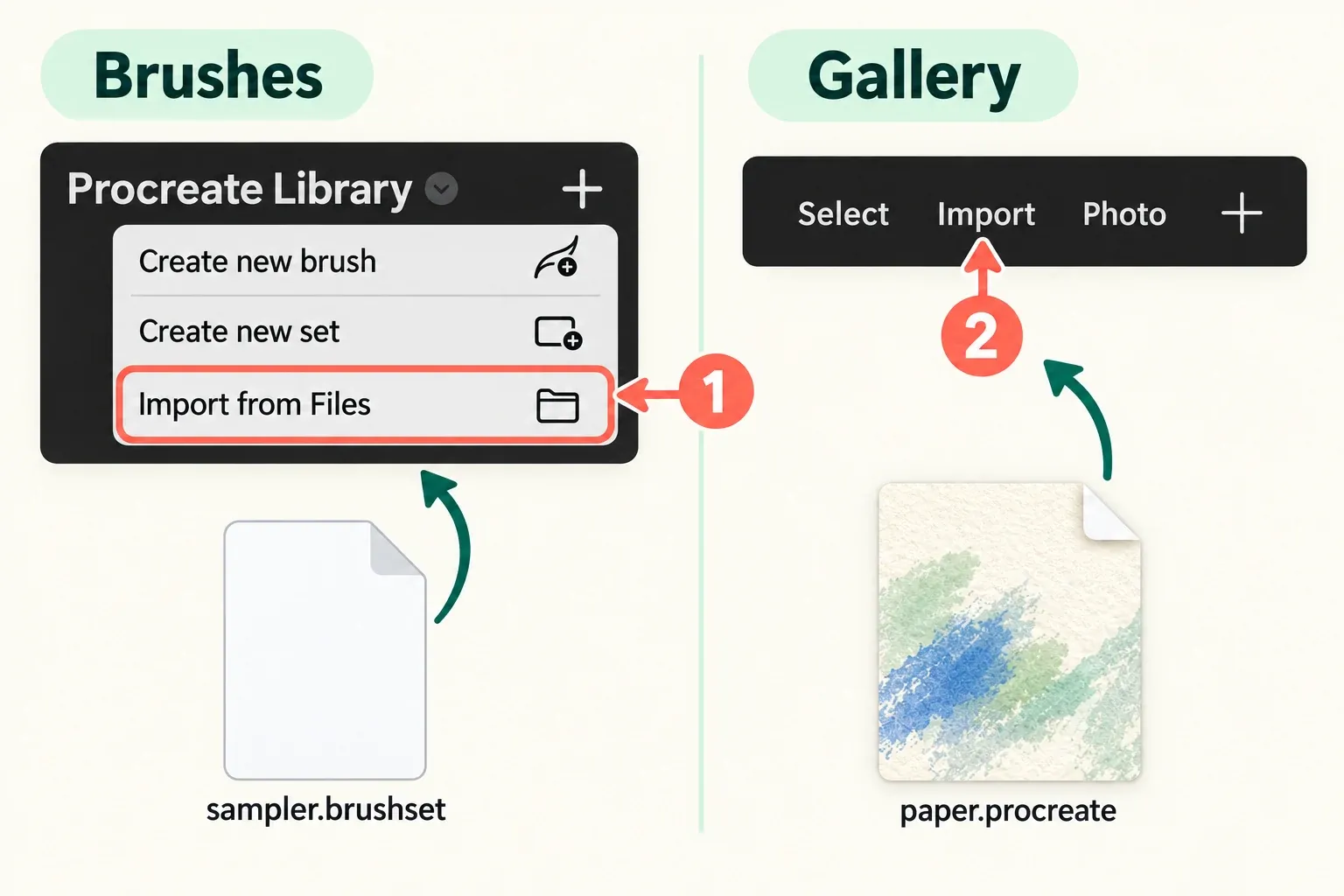
If a brush appears missing after import, check the named Imported set, the imported set in the current library, or the Brush Libraries overview before downloading it again. In 5.4, swipe down from the top of Brushes to open Brush Search, type part or all of the brush or set name, and tap the matching result. The results include other libraries. Our brush import and organization guide covers keeping the files and collection organized.
Choose with a small study on your own iPad
Make a simple study before committing a larger drawing to a new pack. A leaf, an orange, or four small swatches is enough to reveal the decisions that matter to your work:
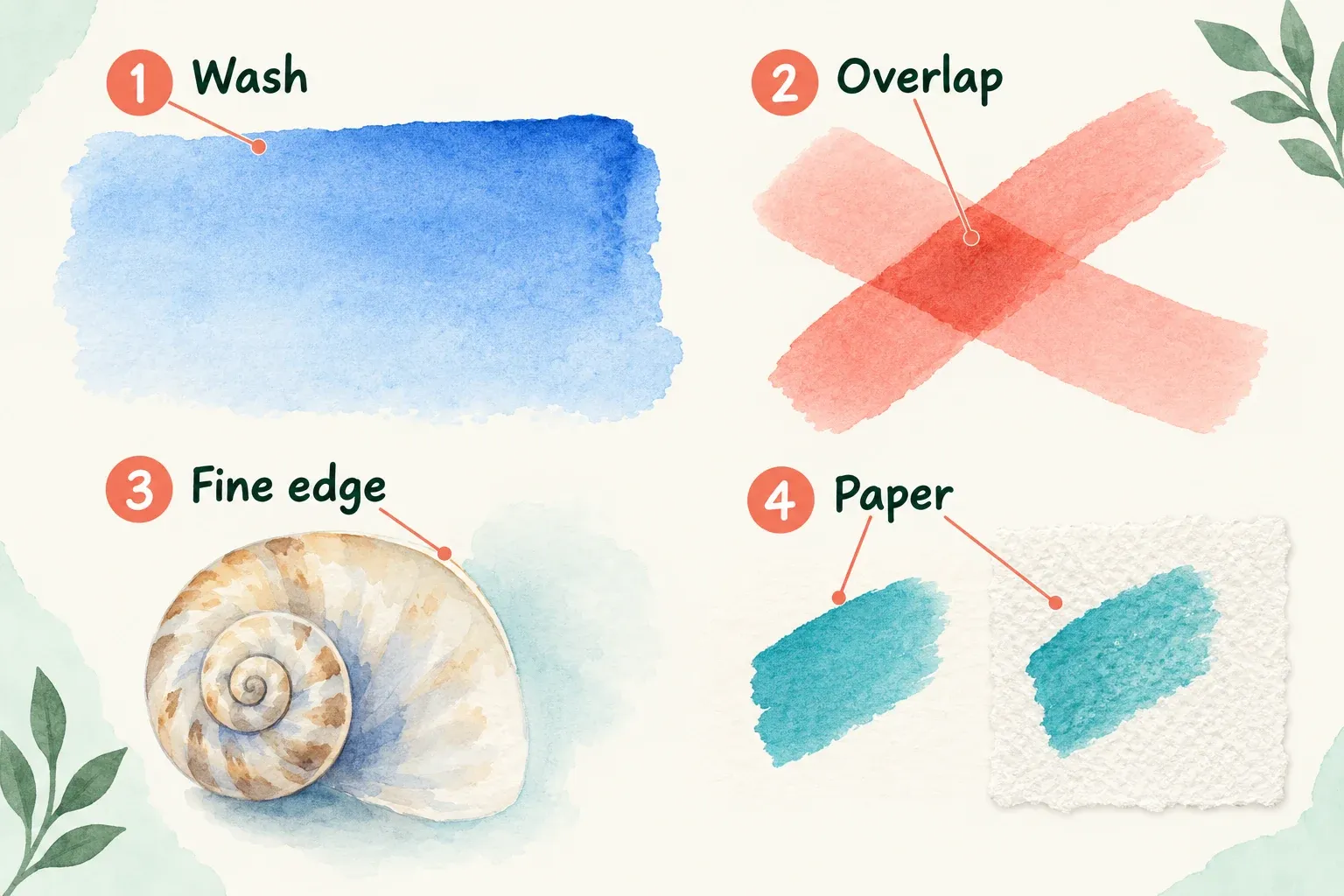
- A broad wash: can you build the light area you want without unwanted repeated marks?
- Two overlapping strokes: do their darker intersections suit your drawing, or do you need to keep lifting the Pencil in different places?
- A fine edge: is there a brush in the free set for the detail you need, or does the lesson use a paid tool?
- The supplied paper: compare the same marks in the creator’s setup and on a plain canvas to see how much the paper contributes.
Keep the canvas, color, brush size, and stylus consistent while comparing options. Follow the supplied user guide before changing Brush Studio settings, and duplicate a brush before editing it. Save the study with a note of the pack and brush names so you can return to the same tools for the finished piece.
For work you plan to sell, make the license decision first. Bardot and Manero publish commercial permissions with redistribution restrictions. Stas’s free set doesn’t. Keep a dated copy of the applicable terms alongside the download, and link another artist to the creator’s page instead of sending them the files.