
Procreate already ships with two brush libraries: the Procreate Library, 18 sets and over 150 brushes added in Procreate 5.4, and the Classic Library you had before, one pinch away in the brush panel. Procreate's own Legacy page and the Folio Resources board are free, single paid sets cost a median of $19 across 69 sets from five shops, and an unlimited subscription runs $199 a year.
I'd learn the built-in libraries before buying anything, because they already cover pencils to comics to 3D materials. I'd also read the license before paying, because a shop like True Grit forbids installing its Photoshop brushes in Procreate.
Below: what each built-in library holds, which source fits which job, where the free sets are, a price table across shops and subscriptions, the license terms that catch people, how to install a set and find it again, and the brush problems that follow a big download.
What brushes come with Procreate?
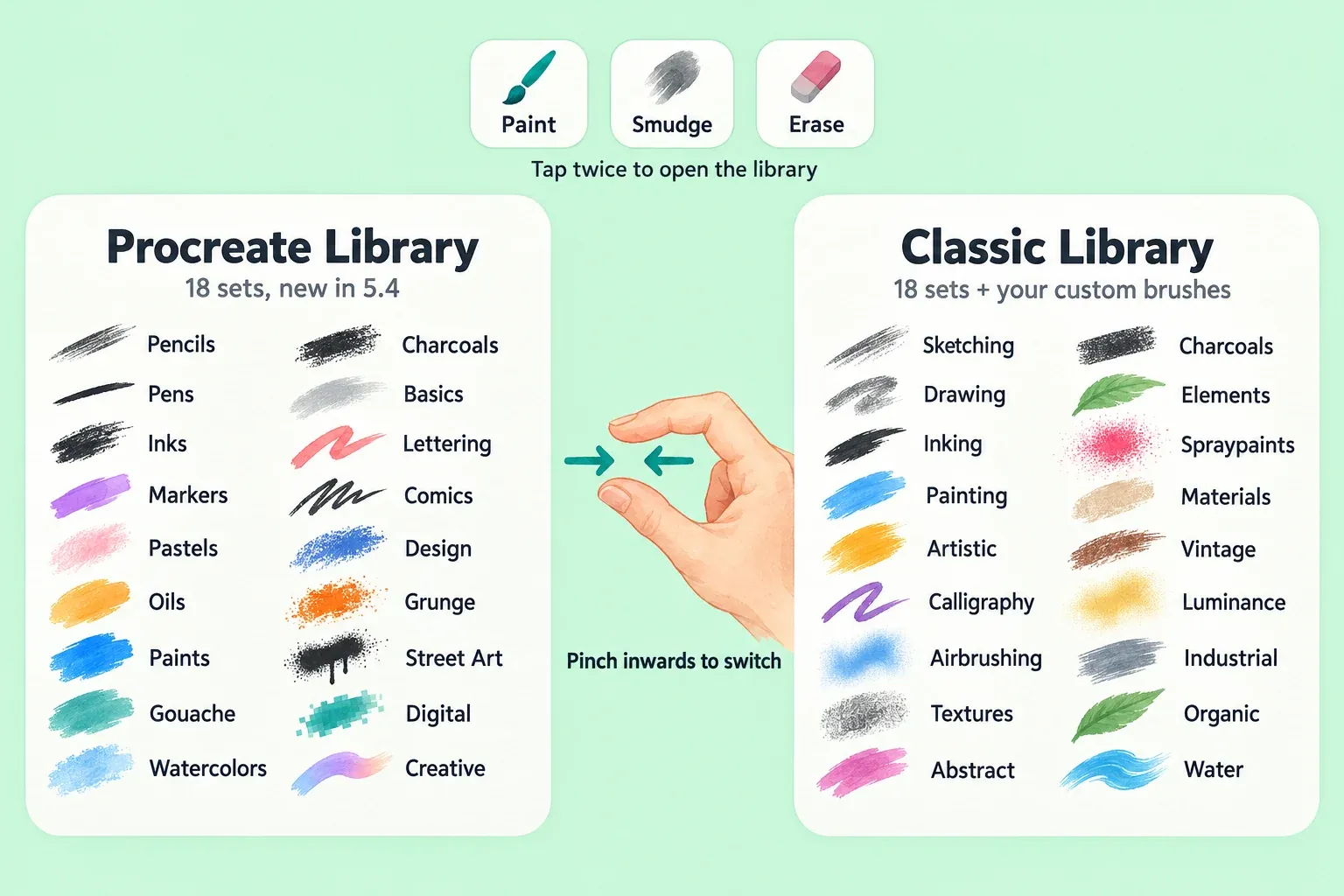
Tap Paint, Smudge or Erase twice to open the brush library: sets on the left, brushes in the active set on the right. Since Procreate 5.4 there are two libraries, and the Procreate Handbook brush library page describes every set in both.
- Procreate Library. 18 sets built by Procreate's in-house brush developer Kyle T. Webster: Pencils, Pens, Inks, Markers, Pastels, Oils, Paints, Gouache, Watercolors, Charcoals, Basics, Lettering, Comics, Design, Grunge, Street Art, Digital and Creative.
- Classic Library. The 18 sets from earlier versions: Sketching, Drawing, Inking, Painting, Artistic, Calligraphy, Airbrushing, Textures, Abstract, Charcoals, Elements, Spraypaints, Materials, Vintage, Luminance, Industrial, Organic and Water. Materials is the set made for 3D Painting.
To switch libraries, pinch inwards on the brush panel, or tap the library title and choose Back to libraries. Whichever library you pick becomes the current one for Paint, Smudge, Erase and Pencil Filters. To find a brush by name, swipe down in the library and type text or an emoji. Recent at the top of the sets holds up to eight brushes you've used; swipe left on one and tap Pin to keep it there.
If your custom brushes seem to have vanished after the 5.4 update, they haven't. The Procreate App Store release notes point out that all custom brushes stay in the Classic Library, which you reach by pinching the brush panel or tapping the Procreate Library title.
Which brush source fits your job?
Start from the job, not the pack. The built-in sets are free and already tuned for the current brush engine, so a purchase should fill a gap you've already hit.
| Job | Start with | When to look further |
|---|---|---|
| Line art and inking | Pens and Inks, or Classic Inking | Compare the built-in line art brushes by line type first |
| Watercolor | Watercolors, or Classic Water | A free watercolor pack if you need blooms or granulation |
| Rendering and shading | Oils, Paints, Classic Painting and Airbrushing | Rendering brush sets for a specific painting style |
| Lettering | Lettering, or Classic Calligraphy | A paid set only for a specific hand-lettered style |
| Comics and manga | Comics | A paid halftone or screentone set if Comics lacks the dot pattern you want |
| Pixel art | Any hard round brush with alpha threshold | Build a hard one-pixel brush yourself |
| Logos, signatures, repeat shapes | A stamp brush you make | Paste your design into a new brush |
| Print grain, risograph, distress | Grunge, Classic Textures and Industrial | Paid texture sets, the area where specialist shops add the most |
Where to get free Procreate brushes
I'd go to Procreate's own sources first, because the files come straight from the people who make the app and you're not trusting a stranger's upload.
- Legacy brushes. The Legacy Procreate Brushes and Palettes page offers the default sets from Procreate 1, 2, 3 and 5, plus the Sweet Treats set, a set of hard-to-find legacy brushes including Bonobo Chalk, and a Chinese Calligraphy set. The All-Star set is no longer offered. Procreate warns that old brushes look and behave differently in newer versions because the brush engine has changed.
- Folio Resources. The Resources board on Procreate Folio is for free resources only; paid content belongs on the Marketplace board. It holds over 5,400 threads, with a staff-featured Brush-making Master class pinned at the top. Quality varies, so open the thread, read the replies and check what the author says about use.
- Brushes for Procreate app. The Brushes for Procreate listing offers 495+ free brushes inside a free app, rated 4.7 from 20K ratings, and works with Procreate Pocket too. It's a third-party catalog, and the listing itself says it's not an official part of Procreate.
Search results also surface Pinterest boards and Gumroad wishlists of "free" brushes. Treat them as pointers to the creator's own page, and download only from there. A paid set reposted for free elsewhere still breaks the shop's license: True Grit's terms, for example, forbid sharing its brushes even for free.
What paid brush sets cost
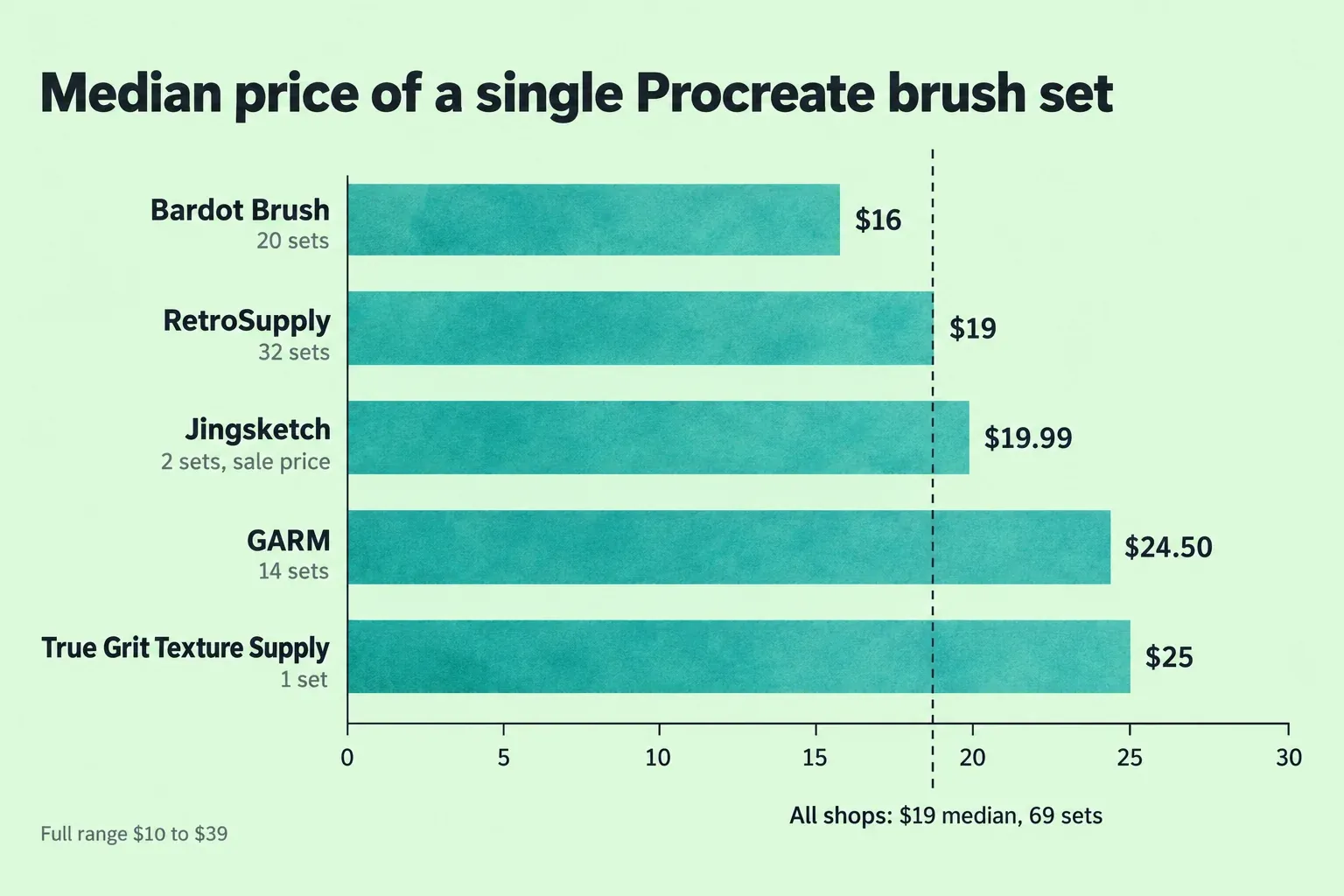
Single sets from five specialist shops come to a median of $19, with the middle half between $19 and $25 and the full range $10 to $39 (69 sets, listed prices including current sales). For scale, that's more than the one-time Procreate price of $12.99 in the US.
| Shop | Single sets counted | Median | Range |
|---|---|---|---|
| Bardot Brush | 20 | $16 | $10 to $24 |
| RetroSupply | 32 | $19 | $19 to $39 |
| GARM | 14 | $24.50 | $18 to $32 |
| True Grit Texture Supply | 1 | $25 | $25 |
| Jingsketch | 2 | $19.99 | $19.99 (on sale from $29.99) |
| All five shops | 69 | $19 | $10 to $39 |
Twenty of RetroSupply's 32 sets sit at exactly $19, which is why the overall median lands there. Bundles are a separate market: Bardot's run from $25 to $165.
Subscriptions change the math:
- Brush Galaxy sells unlimited downloads of its 50,000-brush catalog for $199 a year, renewing yearly, with a commercial license for the art you make, per its Brush Galaxy pricing page.
- Brushes for Procreate opens all 3000+ brushes in the app through in-app purchases listed from $9.99 to $37.99, including six-month and twelve-month subscriptions at $29.99 and $37.99.
I'd buy one set for one job before any subscription. At the $19 median, $199 a year equals about ten sets, and the 36 built-in sets already cover the everyday jobs in the table above.
Read the license before you pay
All three shops below let you sell art made with their brushes. The differences are how many devices you can install on, how big a print run or video can get, and what you can never share.
| License point | Bardot Brush | RetroSupply | True Grit Texture Supply |
|---|---|---|---|
| Commercial art | Yes, personal or commercial work | Yes, personal and commercial | Yes |
| Devices | Multiple iOS devices you own and use | Up to two devices per user | One user, two devices |
| Physical products | No cap stated | Up to 250,000 units | Up to 250,000 units |
| Video and broadcast | No cap stated | 1,000,000 lifetime views | 500,000 lifetime views |
| Sharing the brush files | Not allowed, including edited versions | Not allowed, free or paid | Not allowed, even for free |
The terms sit on the Bardot Brush license page, the RetroSupply license and True Grit's user license agreement. RetroSupply also asks companies over $200 million in yearly revenue to buy an extended license, and Bardot asks you to contact its help page within 7 days of purchase if something isn't right, with a refund if the problem can't be solved.
The trap is the Photoshop file. Procreate imports .abr brushes, but True Grit licenses its Photoshop brushes only for Photoshop and compatible Adobe apps and names Procreate as an app they may not be installed in. If a shop sells both versions, buy the Procreate one.
Install a set and find it again
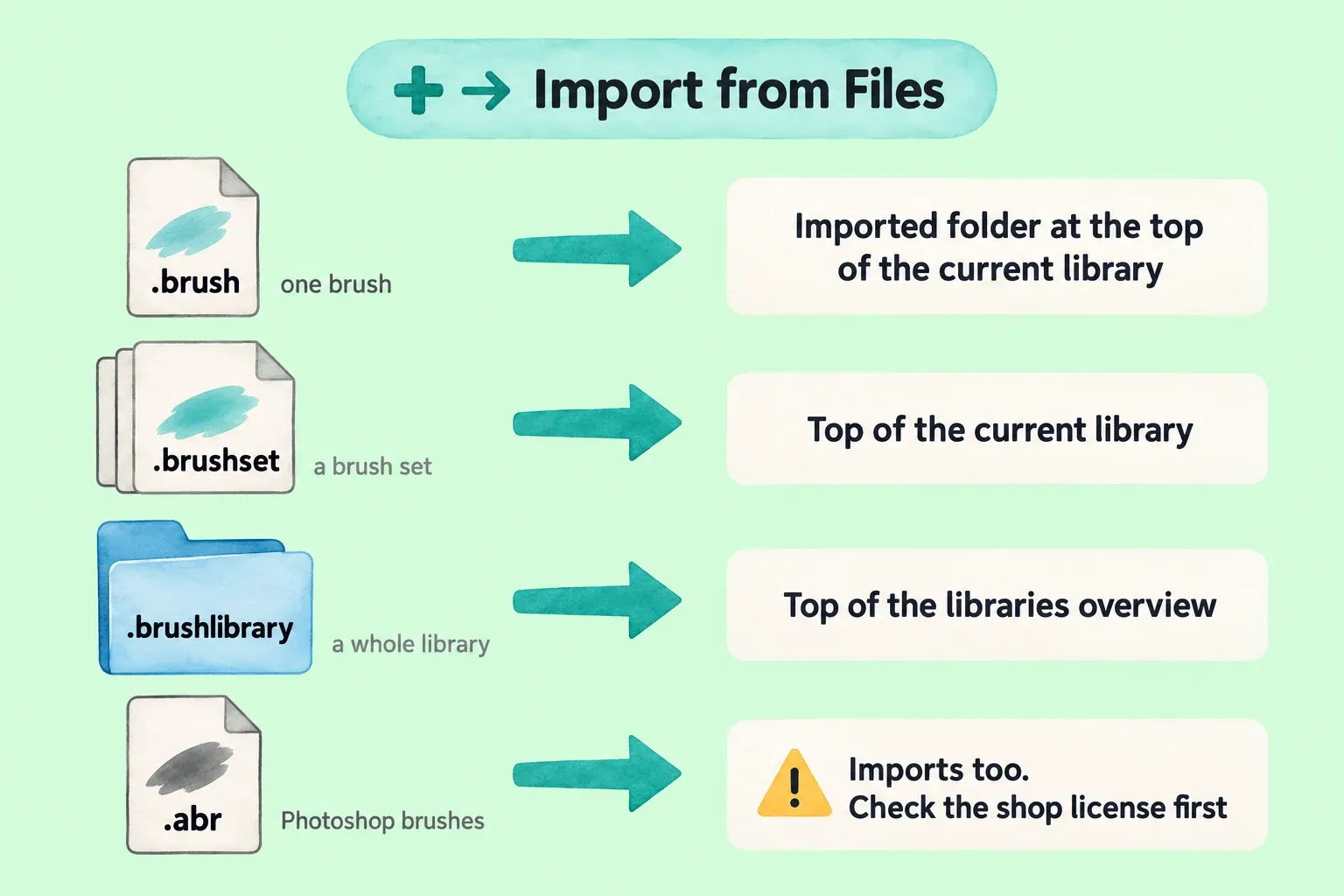
In the brush library, tap + at the top right → Import from Files, then pick the file. You can also tap a brush file online or in an email and accept the import prompt, or drag several files into Procreate at once. Where the brush lands depends on the file type, per the Handbook import and share page:
| File | What it is | Where it appears |
|---|---|---|
| .brush | One brush | A folder called Imported at the top of the current library |
| .brushset | A set of brushes | The top of the current library |
| .brushlibrary | A whole library | The top of the libraries overview |
| .abr | Photoshop brushes | Imported the same way; check the license first |
Since 5.4, brushes are files. They live in On My iPad → Procreate → Brushes or in iCloud Drive → Procreate Brushes, and changes in Files show up in Procreate. Names can't contain characters such as < > : / \ | ? % * or start with a period, because each set and brush is now a file or folder. Downloads often arrive as a zip, so unzip the downloaded file first, then build a named working set so twenty new sets don't bury the three you use.
When to make or tweak a brush yourself
For a single stamp, a signature or one texture, I'd make it myself instead of buying a pack, because a set built around one shape rarely matches your own artwork. Brush Studio has over 100 settings, and 5.4 added alpha threshold for crisp pixel edges, plus spacing, shape roundness, stroke jitter and per-brush pressure curves.
Protect the original first. Procreate keeps every change you make to a brush, so swipe left on it and tap Duplicate before you touch a setting, then experiment on the copy. From there, decide whether to duplicate or start from +, and use the brush settings guide to change one control at a time.
When a new brush feels wrong
- No pressure response. Check the brush's pressure curve and the app settings before blaming the set; the Apple Pencil pressure fix walks through it.
- A brush paints a square or nothing. Usually a shape or grain problem in a homemade or converted brush; see why a new brush paints a square.
- An old favorite looks different. Expected with legacy sets, since the brush engine has changed between versions.
- The brush panel slows down. Procreate 5.4.7 improved panel performance with large numbers of brushes, so update first, then trim sets you never open.
- Brushes duplicating themselves. Recent 5.4 updates list a fix for this, so install the latest version before cleaning up by hand.
Before a big cleanup, back up your brushes outside the live library. Deleting a library removes it from both Procreate and Files.
Procreate brushes FAQ
Are Procreate brushes free?
The two built-in libraries come with the app, and Procreate's Legacy page and Folio Resources board are free. Specialist sets cost money, with a median of $19 for a single set.
Can I use Photoshop brushes in Procreate?
Procreate imports .abr files, but check the license first. True Grit, for one, forbids installing its Photoshop brushes in Procreate, so buy the Procreate version when a shop sells both.
Do Procreate brushes work in Procreate Pocket?
Pocket 5 brush settings are fully compatible with the iPad app, according to the Procreate Pocket App Store notes. Each shop's device rules still apply, so count your iPhone as one of your devices.
Where are my Procreate brushes stored?
In the Files app, under On My iPad → Procreate → Brushes or iCloud Drive → Procreate Brushes. Library folders hold set folders, and set folders hold the .brush files.
Can I sell art I make with bought brushes?
Yes, with the shops compared here. Bardot, RetroSupply and True Grit all allow commercial work, with unit and view caps at RetroSupply and True Grit. None of them lets you share or resell the brush files.
This is an independent guide. It is not affiliated with or endorsed by Procreate.